

20 May Selling Courses in Moodle: What Your Options Actually Cost

Most content about selling courses in Moodle focuses on the setup: Which plugin to install. How to connect a payment gateway. What the checkout flow looks like on the learner side.
That is a useful starting point but a misleading endpoint. The cost of any eCommerce approach is not what it takes to set it up. It is what it takes to run it, particularly at the volume you expect to be operating at in two years, with the type of customers you are actually selling to, and with the admin team you realistically have available to manage it.
This post covers four approaches to selling courses in Moodle. Each one is described honestly: what it gives you, what it costs in direct terms, and what it costs in the terms that rarely appear in feature comparisons – admin overhead, operational risk, and the accumulated friction of running a commercial training operation on an architecture that was not designed for it.
The goal is not to declare a winner. It is to give you the information you need to choose the right approach for your operation, rather than the most visible one.
Who this post is written for
This comparison focuses on commercial training providers – organisations selling training to other organisations (B2B) or to individual learners at meaningful volume. If you are a solo educator selling a handful of courses to individual consumers, your requirements are different, and some of the cost considerations below will not apply to your context.
Approach 1: Moodle's native payment tools
Moodle has had a built-in course payment capability for several years. The current implementation – Enrolment on Payment, connected to the payment gateway framework introduced in Moodle 3.10 – lets administrators set a price on individual courses and accept payment via connected gateways before granting learner access. Stripe is available via a community-maintained plugin that adds coupon code support, subscription handling, and automatic tax calculation. The legacy PayPal enrolment plugin remains available, though Moodle’s own documentation flags it for eventual removal.
For a straightforward use case, this works. A learner navigates to a course, pays, and gains access. The transaction and the enrolment happen inside the same platform. There is no synchronisation step, no second database, and no bridge to maintain.

What it costs
Direct cost: Low. The enrolment framework is part of Moodle core. Third-party gateway plugins are community-maintained and free to install. Payment processing fees apply at the gateway level – typically 1.5 to 2.9 per cent per transaction, depending on provider and volume.
Admin overhead: Low at small scale. Refunds, failed payments, and access issues require manual intervention on a case-by-case basis, but at low volume this is manageable.
Operational risk: Low. No synchronisation chain means no synchronisation failure. The purchase and the enrolment are the same event.
Where it falls short
Moodle’s native tools handle the transaction. They do not handle the commercial operation around it. There is no licence-based purchasing for client organisations buying seats in bulk. There is no client administrator access, so every user provisioning request routes through your central admin team. There is no account-based invoicing for B2B customers who pay on account rather than by card. Catalogue management at scale (pricing tiers, bundle offers, client-specific course access) is not part of the core framework.
For a commercial training provider whose business model involves selling to organisations rather than to individuals, Moodle’s native tools solve the checkout problem without addressing the business model problem. As transaction volume increases and client relationships become more complex, the manual overhead grows in proportion.
Best suited to: Training providers at the early stage, low-to-moderate transaction volume, or direct-to-learner sales where B2B complexity is not a requirement.
Approach 2: WooCommerce via a bridge plugin

The most widely used approach to Moodle eCommerce is also the one that generates the most community discussion about its failure modes. WordPress with WooCommerce, connected to Moodle via a bridge plugin, has been the de facto answer to Moodle’s commercial limitations for over a decade. The pattern is well-established, and the tooling is mature.
It works by separating the commercial and learning layers entirely. WooCommerce handles the storefront, the checkout, the payment processing, and the order management. The bridge plugin listens for completed purchases in WooCommerce and triggers the corresponding enrolment in Moodle via API. The learner completes a transaction on one platform and gains access on another.
What it gives you
WooCommerce’s payment gateway library is the most extensive available. Its marketing tooling includes features such as abandoned cart recovery, bundle pricing, affiliate tracking, discount codes, upsell, and cross-sell mechanics. These features are generally more fully developed than anything built natively into an LMS. For operators with a consumer-facing catalogue where promotional mechanics matter, this is a genuine advantage.
The WordPress ecosystem also provides a significant SEO benefit. WordPress’s content management capabilities, combined with a mature ecosystem of SEO plugins, give operators more control over course landing page optimisation than Moodle’s native page builder typically allows.

What it costs
Direct cost: Moderate. WordPress and WooCommerce are open source and free to install. The bridge plugin carries a licence cost. Hosting costs increase because two platforms require two hosting environments, or a single environment sized for both. Implementation and configuration costs apply, and any customisation (bespoke pricing rules, custom enrolment logic, client-specific behaviour) requires development time on both platforms.
Admin overhead: Moderate to high, and increasing with volume. Two platforms to maintain, each with its own update cadence. Plugin compatibility checks after major Moodle releases. Bridge plugin updates that may change API behaviour. Security patches across WordPress core, WooCommerce, the bridge, and any additional extensions installed.
Operational risk: These are definitely present, and they scale with transaction volume. A completed payment in WooCommerce must trigger a chain of events: bridge notification, API call, user account match or creation, and enrolment. And all this happens before the learner gains access. Each step is a potential failure point. A hosting delay, a cron timing issue, an API timeout, a Stripe webhook that does not reach the bridge: the payment succeeds, and the enrolment does not. At low volume, this is a manageable nuisance. At higher volume with hundreds of transactions per week across multiple client accounts, it becomes a recurring support overhead that absorbs admin time and damages learner experience.
The synchronisation failure pattern
The specific failure mode (payment complete, enrolment missing) is the most consistently documented operational complaint in bridge-based Moodle eCommerce deployments. It appears in community forums, in practitioner content, and in vendor documentation as a known limitation of the architecture.
A February 2026 post from a Moodle commerce vendor describes the WooCommerce bridge approach as ‘high-risk’ for high-growth training providers, specifically citing database desynchronisation and webhook handling failures as the primary causes.
This is not a criticism of WooCommerce as a platform. It is a structural property of connecting two separate systems via a synchronisation layer.
B2B fit: Partial. WooCommerce supports bulk purchase and some licence-style product configurations via extensions, but its architecture is designed around consumer eCommerce rather than B2B training sales. Managing multiple client organisations, each with their own licence pools, their own administrator access requirements, and their own reporting needs, requires customisation that the standard bridge-plus-WooCommerce stack does not provide out of the box.
Best suited to: Operators already running significant WordPress infrastructure, or those with a consumer-facing model where WooCommerce’s marketing and SEO tooling provides clear value. Less suited to B2B training providers managing complex client relationships at scale.
Approach 3: a standalone third-party platform
Some operators run a fully independent eCommerce platform – Shopify, a custom-built course catalogue, or a purpose-built training marketplace – in parallel with Moodle, using API integration or manual processes to manage enrolments. This is the most architecturally fragmented approach and the one with the highest operational overhead, but it exists because some organisations arrive at it through accumulated decisions rather than deliberate design.
What it costs
Direct cost: High. A standalone eCommerce platform carries its own licence or development cost. The integration with Moodle requires custom API development, because a general-purpose eCommerce platform has no native awareness of LMS concepts like courses, enrolments, or completion records. Ongoing maintenance of two entirely independent systems, each with its own hosting, security, and update requirements, is a significant operational overhead.
Admin overhead: High. Every user exists in two separate systems. Every order needs to correspond to an enrolment. Every client relationship requires management across two administrative interfaces. Reporting on commercial and learning performance requires data from both platforms, joined either manually or through custom tooling.
Operational risk: High. All the synchronisation failure risk of the bridge approach, without the established ecosystem of bridge plugins designed to mitigate it. A bespoke API integration has more failure modes than a maintained bridge plugin and fewer community resources for diagnosing and resolving them.
B2B fit: Poor. A standalone eCommerce platform has no concept of a client organisation as a distinct entity within the platform. Licence management, client admin access, and consolidated client reporting all require custom development to approximate.
Best suited to: Organisations that have arrived at this configuration through historical decisions rather than deliberate design, and that are evaluating a migration path. Not a recommended starting point for any operator building a commercial Moodle training platform from scratch.
Approach 4: native LMS eCommerce
The fourth approach builds eCommerce functionality natively inside the LMS itself, sharing the same database, the same user accounts, and the same administrative interface as the learning platform. There is no second platform, no bridge, and no synchronisation step. A purchase and an enrolment are the same event, recorded in the same system.
The concept has gained more attention in the Moodle community since around 2025, as the scale limitations of bridge-based approaches have become better understood. What matters in practice is not whether eCommerce functionality lives inside Moodle, but whether it addresses the full operational requirement of a commercial training business and not simply the checkout, but the licence management, the client administration, the invoicing, and the reporting infrastructure that B2B training sales actually require.
What it costs
Direct cost: Moderate. A native Moodle eCommerce plugin carries a licence cost. Implementation is simpler than a bridge setup because it shares one platform, one database, one hosting environment, which typically reduces the implementation cost relative to a WooCommerce bridge of equivalent commercial capability. No WordPress licence, no bridge plugin licence, no parallel hosting environment.
Admin overhead: Low ongoing. One platform to maintain. One update cadence. One support surface. Client organisations can be given their own administrator access within the LMS, which allows them to manage their own licence pools, add their own learners, and pull their own reports. This distributes the administrative burden away from the central team without requiring custom development to enable it.
Operational risk: Low. No synchronisation chain means no synchronisation failure. The transaction and the enrolment are the same database operation. The failure mode that generates the largest share of support tickets in bridge-based deployments does not exist in a native architecture.
B2B fit: Strong, when the native plugin is designed for commercial training rather than consumer course sales. The distinction matters: a native storefront that handles individual learner purchases within Moodle solves the checkout problem. A native commercial platform that handles licence purchasing by client organisations, client administrator access, account-based invoicing, and consolidated commercial and learning reporting solves the business model problem. These are different products with different scopes.
The operational difference in practice
Consider the administrative difference between the two models at a concrete level. A client organisation purchases fifty licences for a compliance programme. In a bridge-based setup, the purchase is recorded in WooCommerce. The bridge attempts to create the corresponding licence pool in Moodle. The client needs administrator access to provision their own learners, which either requires custom development or means every provisioning request comes back to your central admin team. At month-end, your finance team reconciles revenue data from WooCommerce against enrolment data from Moodle.
In a native LMS eCommerce setup, the purchase creates the licence pool directly in Moodle. The client organisation is given a scoped administrator account that allows them to provision their own learners, monitor usage against the licence pool, and pull their own completion reports – without involving your team. Revenue and learning data are in the same system. Month-end reconciliation is a report, not a cross-platform data join.
At twenty clients, the difference in admin overhead is meaningful. At a hundred clients, it is the difference between an operation that scales and one that does not.
Best suited to: Commercial training providers with a B2B sales model, managing multiple client organisations with licence purchasing requirements, client self-service expectations, and consolidated reporting needs. Also well-suited to providers scaling transaction volume, where the synchronisation failure risk in a bridge setup has become a measurable support cost.
How the four approaches compare at a glance
The table below summarises the key cost dimensions across all four approaches. ‘Admin overhead’ refers to ongoing operational cost, not implementation effort. ‘Sync risk’ refers to the risk of payment and enrolment becoming desynchronised. ‘B2B fit’ refers to suitability for selling to client organisations with licence and self-service requirements.
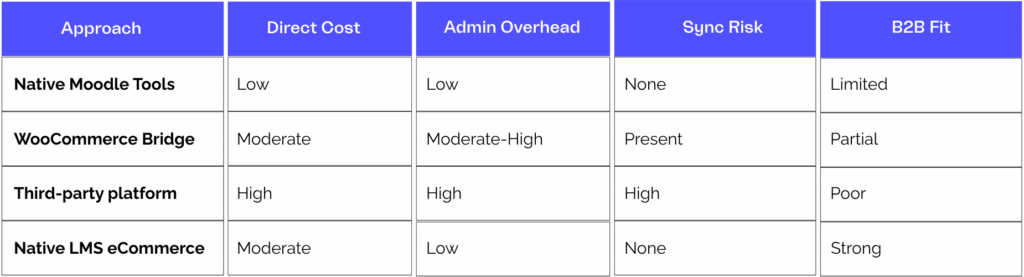
No approach is universally wrong. The right choice depends on your sales model, your current scale, and where you expect to be operating in two years.
Three questions that should drive the decision
Rather than matching feature lists against requirements, there are three questions that cut to the core of which approach fits your operation.

Who is buying from you – individuals or organisations?
If your primary sales motion is B2B – client organisations purchasing licence pools and distributing access to employees – the operational requirements around client admin access, licence tracking, and account invoicing are fundamentally different from direct-to-learner retail. Moodle’s native tools and consumer-grade storefront plugins are built for the second model.
A native LMS eCommerce platform designed for commercial training providers addresses the first.

What does your support team spend time on today?
If you are already running a bridge-based setup, an honest audit is more useful than any feature comparison. Pull three months of support tickets and count how many relate to enrolment failures, payment reconciliation, or access issues following plugin updates. That number is your true operational cost baseline. If it is significant, it will not decrease as your transaction volume grows – it will only increase.
A native LMS eCommerce platform designed for commercial training providers will address this issue.

Where will your transaction volume be in two years?
The approach that works at fifty transactions a month may not work at five hundred. Bridge architecture scales in operational complexity as volume increases: more transactions mean more synchronisation risk, more client accounts mean more cross-platform data management, more plugins mean more compatibility overhead after each platform update.
Native LMS eCommerce scales in revenue without proportionally scaling in admin overhead, in no small part because client self-service distributes the management burden.
A native LMS eCommerce platform designed for commercial training providers will address your scale issues.
Accipio One Shop: The Most advanced native Moodle eCommerce for commercial training providers

Accipio One Shop is Accipio’s implementation of native eCommerce for Moodle and Totara. It is built natively inside the LMS, sharing the same database, user accounts, and reporting infrastructure and is designed specifically around the requirements of commercial training providers rather than individual course creators.
Licence pool purchasing, client administrator access, account-based invoicing for B2B customers, and consolidated commercial and learning reporting are built into the product rather than available as extensions.
And because it is native to Moodle and Totara, there is no bridge to maintain, no WordPress dependency, and no synchronisation failure mode. Platform updates are managed as part of Accipio’s managed hosting service, not as a separate compatibility exercise across two independent codebases.
Accipio holds Moodle Premium Certified Partner status and Totara Platinum Partner status. Accipio One Shop is one component of the Accipio One plugin suite, which also covers apprenticeship management, assessment governance, and skills diagnostics.
If you are evaluating eCommerce options for a Moodle or Totara platform and your sales model involves client organisations, licence management, or B2B invoicing, the Accipio One Shop page covers the details.

Frequently asked questions about selling courses in Moodle
How do I sell courses in Moodle?
Moodle supports course sales via its native Enrolment on Payment framework, via WooCommerce bridge integrations, via standalone third-party eCommerce platforms connected through API, or via a native LMS eCommerce plugin. The right approach depends on your sales model – whether you are selling to individuals or to organisations – and the operational scale at which you need it to perform.
Is WooCommerce the best way to sell Moodle courses?
For consumer-facing training businesses at modest volume, WooCommerce is a capable and widely understood approach. For commercial training providers selling to organisations, where licence management, client self-service, and B2B invoicing are operational requirements, the synchronisation overhead and database fragmentation of a bridge-based setup become meaningful costs at scale. A native LMS eCommerce platform avoids these structural limitations.
Can Moodle handle B2B training sales?
Moodle’s core tools are designed for direct-to-learner transactions. B2B requirements, including features such as licence purchasing by client organisations, client administrator access, account-based invoicing, and consolidated reporting across commercial and learning data, require either a bridge to a third-party platform or a native LMS eCommerce plugin built for this purpose.
Accipio’s Shop plugin, built natively for Moodle and Totara, addresses these requirements without the need for a second platform.
What does selling courses in Moodle cost?
Direct cost varies significantly by approach. Native Moodle payment tools carry no additional licence cost beyond gateway processing fees. A WooCommerce bridge carries a bridge plugin licence, additional hosting for a WordPress installation, and implementation costs. A native LMS eCommerce plugin carries a licence cost alongside implementation, but typically has a lower total implementation cost than a WooCommerce bridge of equivalent commercial capability, because there is one platform to configure rather than two.
The total cost of ownership, including ongoing admin overhead and the cost of synchronisation failures at scale, is covered in the comparison above.
What is the difference between selling courses in Moodle and running a training eCommerce operation on Moodle?
Selling courses in Moodle means adding payment functionality so individual learners can purchase course access. Running a training eCommerce operation means managing the full commercial layer: catalogue pricing, licence pools, client organisation accounts, B2B invoicing, and reporting across revenue and learning performance. Moodle’s native tools address the first. A native LMS eCommerce plugin designed for commercial training providers addresses both.
For more on why the architecture of your eCommerce layer matters as much as the features, see our post on why Moodle eCommerce is an architecture problem.