

28 Apr Moodle AI: What it Does, How it Works, and What to Expect Next
Moodle AI is a set of features that bring artificial intelligence into the platform itself, generating course content, summarising forum discussions and drafting feedback for tutors. It works through AI placements and providers configured by a site administrator, and is available in both Moodle LMS and Moodle Workplace.
Accipio configures and supports Moodle AI for UK organisations — see how Moodle Workplace handles it.

Artificial intelligence (AI) is transforming the educational landscape, but how is Moodle going to leverage the power of AI within the world’s most popular learning management systems (LMS) to improve the online learning experience?
Why your LMS is now being asked to do more with AI
There is a version of this conversation happening in almost every L&D team right now. The organisation has adopted AI tools for marketing, for operations, for customer service. Leaders are asking what the learning platform is doing to keep pace. Sometimes the question is pointed. Sometimes it is genuinely curious. Either way, it lands on the same desk.
For organisations running Moodle, the answer is more substantial than many people realise. Moodle’s AI capability is not a roadmap item or a demo-only feature. It has been built, shipped, and refined across two major platform releases. The question is no longer whether Moodle has AI. It is whether your platform is configured to use it.
This guide covers what Moodle’s AI subsystem actually does today, how it is structured, what Moodle 5.0 and 5.2 have added, and where Accipio’s own AI-driven capability sits in relation to all of it. The distinction between native Moodle AI and Accipio-built extensions matters, and it is spelled out clearly below.
What Moodle’s AI subsystem actually is
The Moodle AI subsystem, introduced as a formal architectural component in Moodle 4.5, is not a single feature. It is a framework: a controlled layer that sits between the people using the platform and the AI models doing the work.
The subsystem has three components. Providers are the AI models themselves – OpenAI, Google Gemini, Azure, AWS Bedrock, Groq, and open-source options including Ollama, LiteLLM, and LocalAI. Placements are the points within Moodle where users interact with AI – the text editor, the course assistant, the summarisation tool. The Manager is the controller sitting between the two, handling requests, logging actions, and enforcing policy.
The design logic is deliberate. Organisations configure which providers are active, which placements are switched on, and which user roles can access which capabilities. Nothing is on by default in a way that bypasses administrator oversight. For L&D teams working in regulated industries (financial services, healthcare, public sector), that level of control is not a convenience. It is a procurement requirement.
Governance note: Before any user can interact with AI features in Moodle, they must accept the Moodle AI User Policy. This acknowledgement happens at the point of use, in line with emerging AI legislation. For organisations subject to regulatory scrutiny around AI adoption, this is worth surfacing early in any internal approval process.
The other design decision worth understanding is provider independence. Moodle’s AI subsystem is explicitly built so that no organisation is locked into a single AI model. Administrators can configure multiple provider instances for different tasks – a lighter, faster model for content summarisation; a more capable model for text generation – and set fallback rules when one provider reaches its limits. As AI models continue to develop and pricing evolves, this flexibility has real long-term value.
What Moodle AI can do today
The following covers what is available in current releases of Moodle LMS (4.5 through 5.2). Features are grouped by the person using them, rather than by the technical category they sit in.
For L&D managers and content creators
The most immediately useful capability for most L&D teams is AI-assisted content creation inside the Moodle text editor. With the appropriate permissions enabled, users can generate text for course descriptions, learning objectives, or page content, and generate images to accompany written material. All AI-generated content is automatically tagged so that learners can see what has been produced with AI assistance. This transparency is built into the subsystem by design, not added as an afterthought.
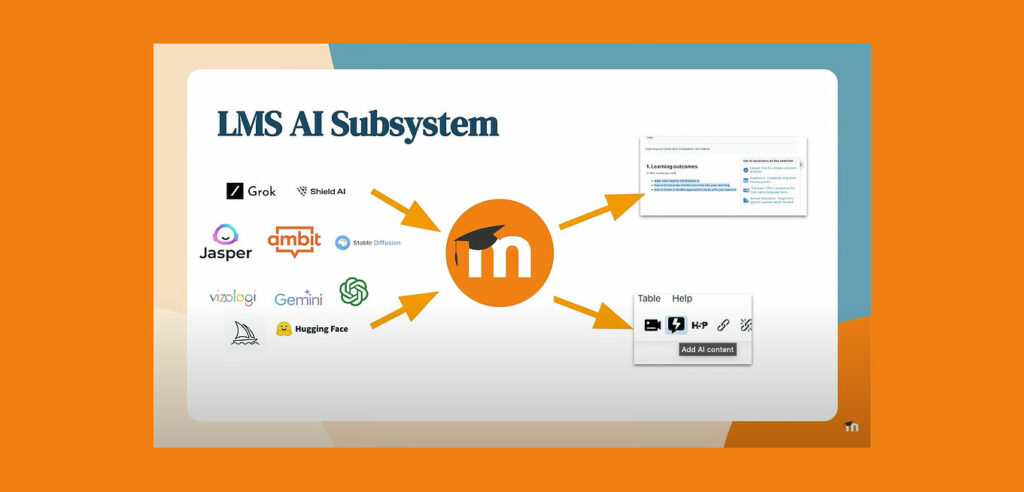
Content creation overhead is one of the consistent pressure points in L&D teams operating with limited resource. The ability to draft course copy, produce quiz questions from existing documents, and generate supporting imagery inside the platform, without switching to external tools, removes friction from a workflow that has traditionally been slow.
Course organisation has also improved. Moodle 4.5 introduced Subsections, allowing content owners to group related materials into logical clusters without a third-party plugin. This is a course design capability that reduces cognitive load for learners by breaking content into navigable chunks, and it works alongside the AI content tools rather than independently of them.
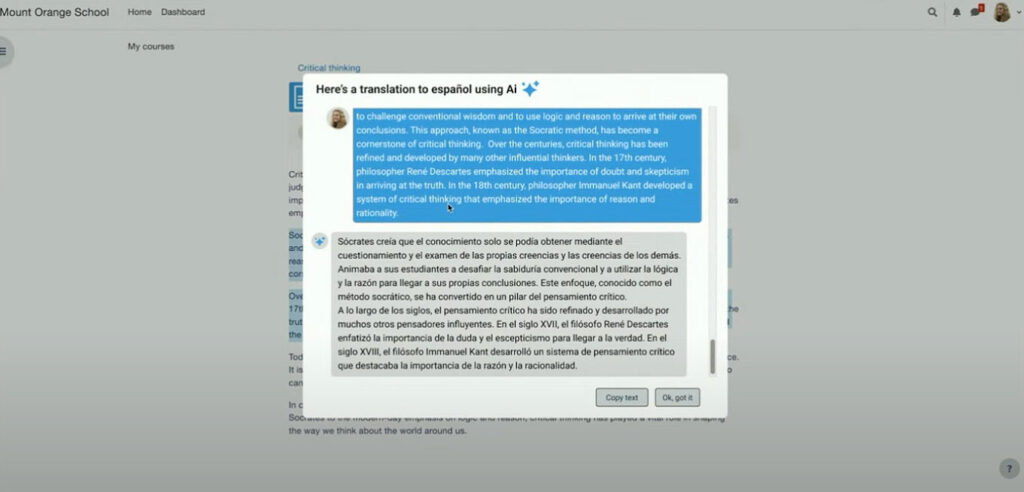
A user, for example, could click a button to translate the selected text across into a different language, all within the LMS environment.
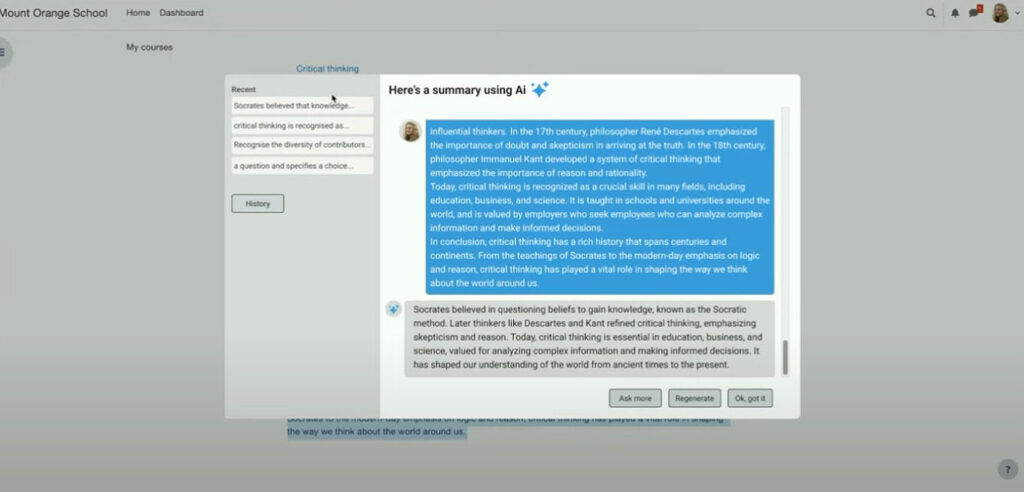
Alternatively, the selected text could be summarised – providing headline key points and stats at-a-glance.
For learners
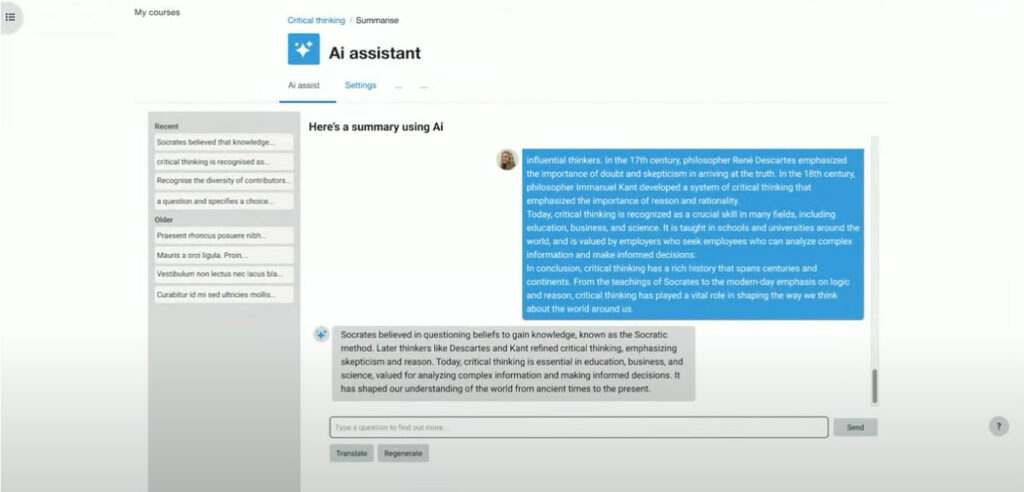
When instructors enable learner-facing AI features, people working through courses can use AI to summarise long-form content and generate explanations of complex material. All actions are logged for review, which gives course administrators visibility of how learners are using the tools and whether the outputs are supporting learning rather than replacing it.
Moodle’s approach to academic integrity is also built into this. The platform is committed to preventing learners from using AI to obtain quiz answers or gain unfair advantages in assessed work. The subsystem’s logging and content-tagging architecture supports this commitment at a platform level rather than relying on honour alone.
For platform administrators
Administrators gain the ability to configure multiple provider instances and assign them to different tasks. A practical example: a lightweight model handles summarisation requests across the platform because they are frequent and do not require the full capability of a premium model. A more powerful model is reserved for text generation tasks where quality and nuance matter more. This approach manages cost without compromising the learner experience.
Moodle are developing a user-friendly and consistent UX/UI approach to help learners know when AI technologies are available to them within the LMS. To achieve this, while not detracting from the native LMS experience, the developers have adopted the ‘sparkles’ iconography. This has become the conventional method of signposting users to AI-powered integrations or tools.
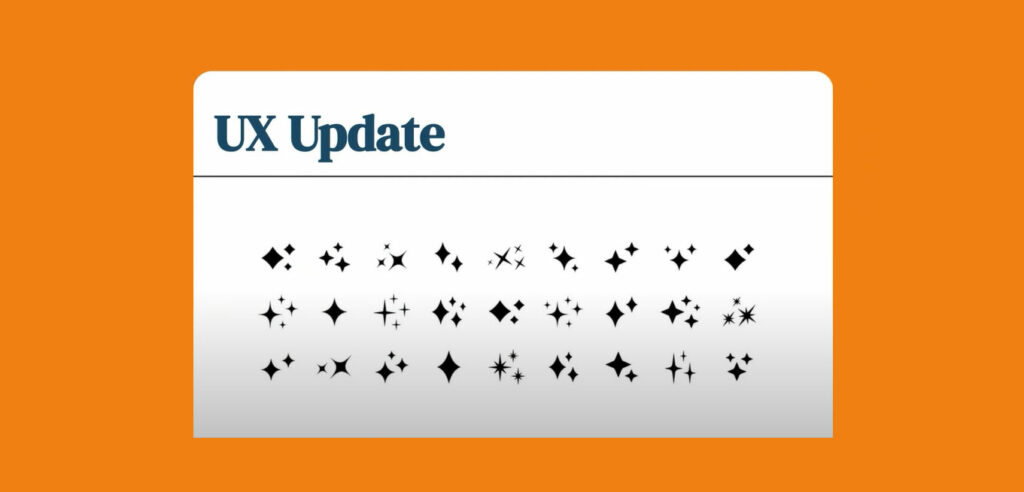
Moodle is working hard to provide these types of AI integrations to keep their users inside the Moodle LMS. This will help to avoid people needing to access any third-party websites or services to facilitate their learning. Jumping between tabs can affect and interrupt the user journey, while also increasing cognitive load.
What Moodle 5.0 and 5.2 have added
Moodle LMS 5.0, released in April 2025, made it easier for administrators to configure AI tools and gave them more control and flexibility over how the subsystem operates across the platform. A new Activities page also gave educators and learners a single view of course activities, deadlines, submissions, and grading progress – a usability improvement that complements the AI layer rather than sitting separate from it.
Moodle LMS 5.2 expanded AI provider support to include Google Gemini and AWS Bedrock. For organisations with existing cloud infrastructure on AWS, or with a preference for Google’s model family, this is a significant practical addition. It also gives organisations in regulated sectors more flexibility to choose a provider whose data residency and processing terms align with their compliance requirements.
The trajectory is consistent. Each Moodle release since 4.5 has added to the AI subsystem rather than treating it as a fixed feature set. Organisations that have configured the subsystem now are positioned to adopt new capabilities as they ship, without needing to rebuild their approach from scratch.
Two layers of AI capability: native Moodle versus Accipio-built
If you are running Moodle through Accipio, there are two distinct AI layers available to you. They operate differently, serve different purposes, and should not be conflated.
The first is Moodle’s native AI subsystem, described throughout this post. It is part of the Moodle core and is available to any organisation running Moodle 4.5 or later. Configuration and activation are required – the subsystem does not switch itself on – and getting the most from it requires understanding which providers to connect, which placements to enable, and how to structure the governance so that AI use is visible and controlled.
The second layer is Accipio One, Accipio’s proprietary plugin suite built on top of Moodle Workplace and Totara. At Accipio, we continue to be a driving force in the future of online education and the role of AI.
When it comes to AI, we have also led the way with our multi-award-winning Accipio One plugin ecosystem, which extends both Moodle and Totara to the next level.
Our Accipio Shop plugin – the world’s most advanced native shop for Moodle and Totara – was recently recognised at the Totara Awards 2024 – where Accipio won the ‘Best Use of Integrations’ prize – our fifth Totara award in consecutive years.
Accipio One also features in-built diagnostic tools, which can be used to conduct 360-degree skills audits on each individual learner, providing AI and machine learning recommendations for learning, based on the individual’s strengths and weaknesses.
For organisations whose L&D strategy requires personalised learning pathways, skills-gap identification at scale, and automated programme recommendations, the two layers working together deliver capability that neither provides independently.
As a Moodle Premium Certified Services Partner, we are one of only four organisations in the UK that is licensed to provide Moodle Workplace. We provide Workplace alongside Moodle LMS.
If you are evaluating whether your current Moodle configuration is making proper use of either AI layer, that is a conversation worth having before your next contract renewal.
For over a decade, we have also been a Totara Platinum Partner. We support some of the world’s biggest brands to deliver innovative LMS platforms. Past clients have included PepsiCo and the Premier League.
For more information about any of our digital learning services, please get in touch.
About Moodle
Moodle is one of the world’s leading open-source learning platforms (see our LMS guide). The organisation was founded over two decades ago in Perth, Western Australia. Moodle LMS quickly became one of the most popular learning platforms on the market and a firm favourite with educators.
In 2019, Moodle introduced the highly-anticipated Moodle Workplace platform. The corporate distribution of Moodle. Designed to help businesses upskill their people. Discover the key differences between Moodle LMS and Moodle Workplace in our related guide.
Frequently asked questions about Moodle AI
Is Moodle AI free?
Moodle’s AI subsystem is built into the Moodle core from version 4.5 onwards, so there is no separate licence cost for the framework itself. However, the AI capabilities require a connection to an AI provider – OpenAI, Google Gemini, Azure, AWS Bedrock, and others – and those providers charge for API usage. The cost depends on which provider you choose, how heavily the features are used, and how you configure provider instances to balance capability against cost. For organisations running Moodle through a managed partner like Accipio, provider configuration and cost optimisation are part of the implementation conversation.
Which AI providers does Moodle support?
Current releases of Moodle support OpenAI, Google Gemini, Azure, AWS Bedrock, and Groq, alongside open-source options including Ollama, LiteLLM, and LocalAI. Moodle has confirmed that additional provider support will be added in future releases. The subsystem is designed so that organisations can run multiple provider instances simultaneously and assign different models to different tasks.
Can I control which users access AI features in Moodle?
Yes. Access to AI placements and actions is controlled by administrator-configured permissions, assigned by role. An organisation can enable AI content generation for course authors while keeping learner-facing AI tools switched off, or enable summarisation for all learners while restricting image generation to specific roles. All configurations are managed through the AI settings in Moodle’s site administration.
Is Moodle AI suitable for regulated industries?
Moodle’s AI subsystem is designed with governance and data protection in mind. AI-generated content is transparently labelled. All AI interactions are logged. Users must accept the Moodle AI User Policy before using any AI feature, with acknowledgement recorded at the point of use. Provider independence means organisations can choose a provider whose data residency, processing terms, and security certifications align with their regulatory environment. For sectors including healthcare, financial services, and public sector, these are meaningful design decisions rather than marketing claims. Specific compliance requirements should be verified with your legal and data protection team.
What is the difference between Moodle AI plugins and the Moodle AI subsystem?
Moodle’s open-source plugin directory has included AI-adjacent plugins for several years, tools that connect Moodle to external AI services, add chatbot functionality, or extend the question bank. These predate the native AI subsystem and continue to be available. The AI subsystem introduced in Moodle 4.5 is different: it is a formal architectural layer built into Moodle’s core, providing a consistent and governed framework for AI integration across the platform. New AI capabilities built on the subsystem benefit from its centralised administration, logging, and provider management. For organisations evaluating AI options for their Moodle platform, the distinction matters because subsystem-based features are maintained as part of the Moodle core rather than as independent third-party plugins.
What is the difference between Moodle’s native AI and Accipio’s AI features?
Moodle’s native AI subsystem is part of the Moodle core and available to any organisation running Moodle 4.5 or later. Accipio’s AI-driven features – including 360-degree skills scanning, Individual Learning Plan generation, and AI-driven content curation – are part of Accipio One, Accipio’s proprietary plugin suite. These are built and maintained by Accipio, operate on top of Moodle and Moodle Workplace, and are available exclusively to Accipio clients. The two layers complement each other and can operate in parallel on the same platform.